NEO Planner V5.0 - All observations - Explanations
NEO Planner Page obtained from data from the MPCAT-OBS of the MPC:
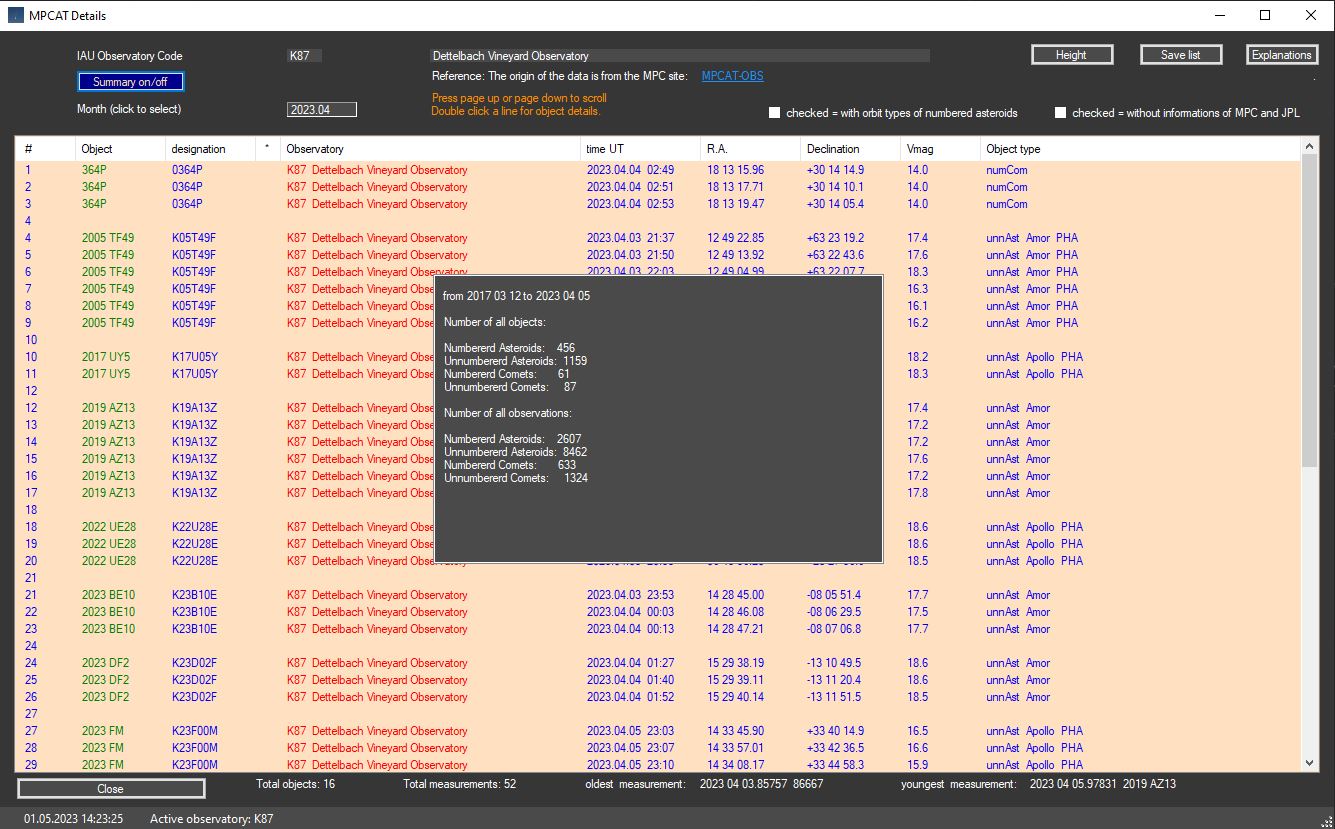
Example of observations from station K87 Dettelbach Vineyard Observatory with observations taken in April 2023..
The observations come from the loaded
MPCAT-OBS archive of the
MPC.
This data will
probably be updated at the same time as the last publication of the
MPC archive.
The observations can therefore have a time lag of several months.
For performance reasons, only the data for one month is displayed. With
>Month (click to select)<
a month can be selected
for the entire available observation period of the
active station.
You can also scroll forwards and backwards by month via
Page Up or Page Down
on the Window.
For unnumbered comets and asteroids, information
about the object is displayed in the Object type column.
If desired, information about numbered asteroids
can also be displayed by activating the checkbox.
However, this is not recommended due to long loading times and should only be
used in exceptional cases.
By double-clicking on a position in the list view, the corresponding pages of
the object from
JPL Horizon and
MPC are called up in your browser.
This can be prevented in the second checkbox if desired.
Pressing the Save List button loads .jpg, .txt and .csv files into the archive folder.