NEO Planner V5.0 - Object information - Explanations
Within the picture, click on the area that you want to be explained: (not in all browsers available)
Program from November, 30 2024 for K87 Dettelbach Vineyard
Observatory:
35 NEOs from the planning were measured, one of which
was a confirmation of a NEOCP object. Also 3 comets.
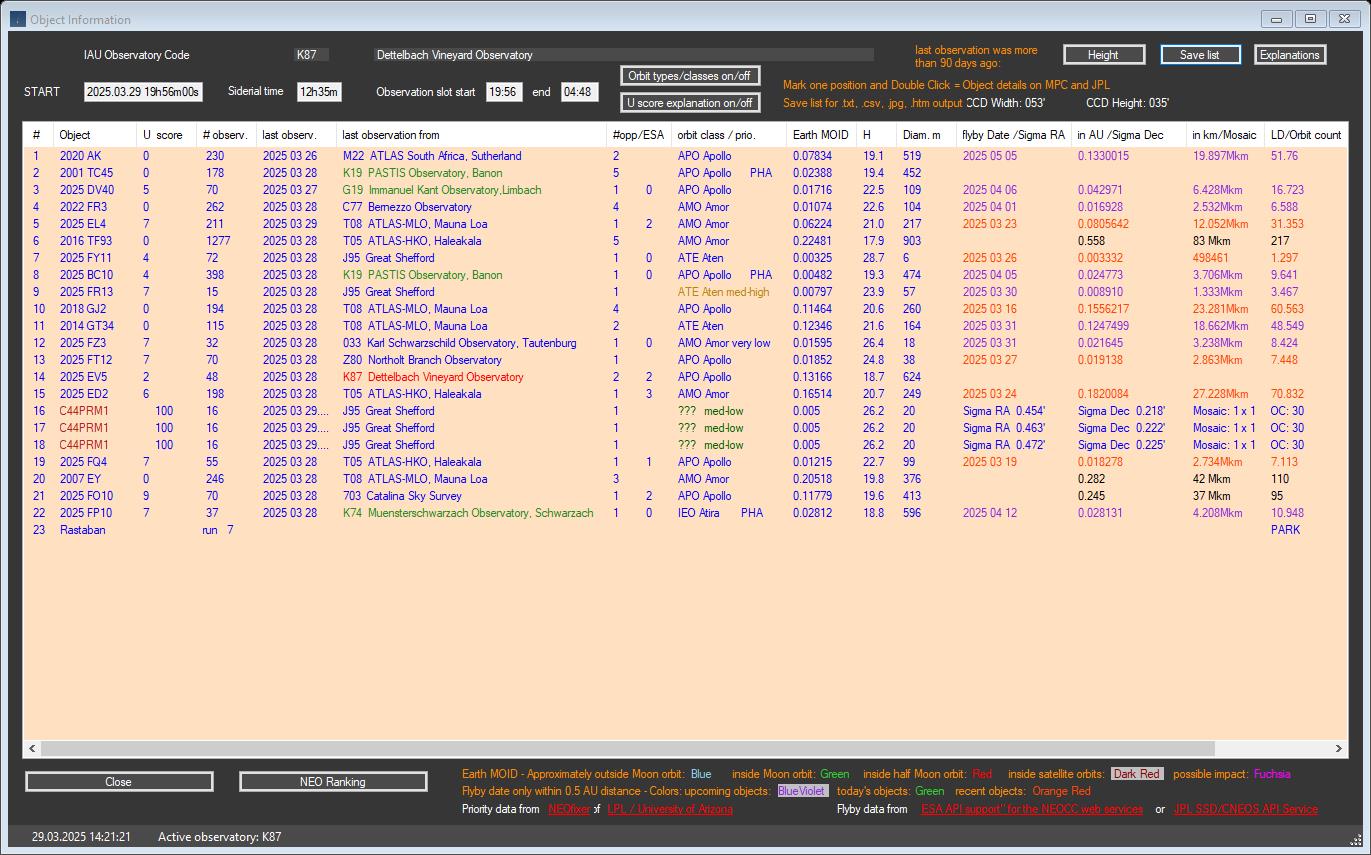
The observatories marked in green and red are users of NEO Planner.
New feature since May 2025:
When the NEOCP background check is active, a newly assigned provisional number
is now displayed in dark violet in the Hint column
of the Revise Window for NEOCP objects, if available. In this case,
the old NEOCP designation is also displayed in dark violet.
In addition, some columns in the Object Information Window are displayed in dark
violet.
Copyright: The
data comes from official access to web services from
MPC,
JPL,
NASA and
ESA,
whose origins are the tireless measurements of dozens of professional and
amateur observatories around the world
A guide for getting an IAU observatory code you find here: Guide to Minor Body Astrometry (minorplanetcenter.net)
List of observatory codes: List of observatory codes - Wikipedia
The calculated local starting
time of the planning is determined from various sources.
The basis is the daily loading of current astronomical data of a location from
IpGeolocation.io,
which takes place automatically when NEO Planner is
started. See also: GEO
Settings.
The offset hours and minutes that were specified in the
Common Restrictions
settings are added
or subtracted from the determined local sunset and
sunrise times.
The start and end times of the
planning can only be reliably calculated in this way,
since automatically determined twilight times are not suitable for depicting the
observation slots obtained from empirical values.
Only the observer himself can determine when the observation should begin after
sunset.
This depends on the experience of the observer himself.
The sidereal time is a central and by no means one of the most important parameters of NEO Planner.
The magic formula is: (Special design for NEO Planner by Father Christoph Gerhard (K74)):
Siderial time (decimal) = 6.625 + 0.06570982 * (Current date - '2019-01-01' + 1) + geographical longitude / 15 + 1.002738 * (midnight UT (decimal))
Then the conversion into hours
and minutes takes place.
The formula shows that longitude plays an important role, which enables NEO
Planner to be used in all regions of the world.
The sidereal time in
combination of RA object is the criterion for reliably determining NO GO areas,
since the transit times of objects through the meridian have to be taken into
account, especially with German mounts.
In addition, the sidereal time helps to calculate the correct order of the
objects according to RA.
Both the sidereal time and midnight UT is saved with every planning in the SiderialTime.txt file in the <Daily Planning> folder (see File Structure settings).
The observation period in local time of the coming night.
The basis is the daily loading
of current astronomical data of a location from
IpGeolocation.io,
which takes place automatically when NEO Planner is
started. See also: GEO
Settings.
The offset hours and minutes that were specified in the
Common Restrictions
settings are added or subtracted
from the determined local sunset and
sunrise times.
Switches for displaying the orbit types and classes
On the one hand, the entire window is saved as .jpg in the archive folder.
In
addition, the content of the list display is saved both in .txt
and .csv files for further
use (see
File Structure settings).
Additional backup of the Object Information Window as an
.HTM file,
if allowed in the Privacy.
Now both the
Revise
Window and the
Object Information Window can be saved as an HTM file on the NEO Planner
Server
and accessed or linked for free use on the Internet via any browser.
Designations of NEO, NEOCP, comet or special classes.
Comets are displayes in green.
All NEOCP objects in red that can be observed according to the parameter
settings are displayed.
Visible NEOs in blue are included
either they are numbered or have not yet been numbered, i.e.
have a provisional number.
Objects with special object classes are displayed in black.
For known objects other than NEOCP, the Uncertainty parameter U
from the orbital elements is displayed.
Wikipedia.
A popup menu for U is displayed on mouse hover over
the U / score column.
Otherwise the score that is displayed on the NEOCP for new objects, please refer: The NEO Confirmation Page (minorplanetcenter.net).
Number of all observations of the objects published by the MPC.
Last published observation date of the object.
The IAU observatory with the last published observation date of the object.
For NEOCP objects, the most recently observing observatory is
shown with color saddlebrown and three exclamation
marks !!!
if the discoverer observatory has not yet made a confirmed NEOCP discovery.
NEO Planner users are shown in the color forestgreen, the observer's selected observatory in red.
Number of previously observed orbits of the object around the sun and ESA priority NEO list: 0 (most urgent) to 3 (least)
The NEO listed here essentially belong to four groups. These are
Apollo,
Amor,
Aten
and Atira.
Some of them are PHA
potentially hazardous objects.
In addition to the object class, the priority of the objects
from NEOfixer of the
JPL is displayed, if available.
An explanation of priority can be found
here.
Comet classes are shown in green, special classes like Mars Crossers, TransNeptunians etc. in black.
The Earth
MOID of an object is the value in AU of the
previously calculated smallest possible distance to earth in an orbit.
This value is permanently adjusted when recalculating orbital elements through
new observations from MPC and JPL.
H is the absolute magnitude of Solar System bodies.
The diameter of an asteroid is calculated using a standard formula.
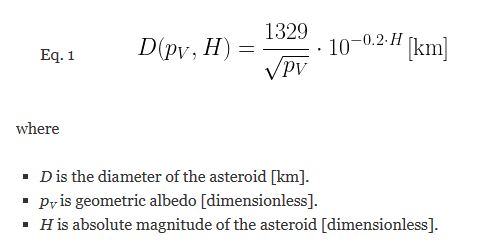
Credit: Image from: Asteroid Size Estimation | Math Encounters Blog (mathscinotes.com)
NEO Planner is calculating the diameter with:
Hdurchpot = -0.2 * H
Diameter (m) = (1329 / 0.3872983346207417) * (10 ^ Hdurchpot) * 1000
Flyby informations for NEO and comets:
The flyby information comes from web service access to ESA (NEOCC)
and
CNEOS
databases.
A distinction is made as to whether objects are approaching
(blue-violet) or moving away (orange-red).
Objects that pass the earth today are shown in green. In general, only those
flyby data can be displayed with a minimum distance of 0.5 AU.
The Vmax value is only supplied by NEOCC and represents the maximum expected brightness of the object during flyby.
Sigma-1 informations for NEOCP objects:
Determining the Sigma-1 range
values for NEOCP objects using the Scout API for the observatory.
The Sigma values are loaded based on the inputs of the JPL Scout n-orbits
including the corresponding checkboxes scaling or all orbits
in the Object selection settings.
Therefore, a direct comparison of the Sigma-1 ranges in the JAVA plot "Display"
on the Scout page of the object is not possible.
NEO Planner thus excludes the outliers of the Scout plot and displays the
determined Sigma-1 values in the Object Information Window.
These are compared there with the FoV of the equipment and mosaic suggestions
are displayed.
In order to facilitate the selection of the NEO to be observed,
this window can
be used to sort the list according to the columns "last observation", "Earth
MOID", "H", flyby date "or flyby distance fields.