NEO Planner V5.0 - Orchestrate Parameters - Explanations
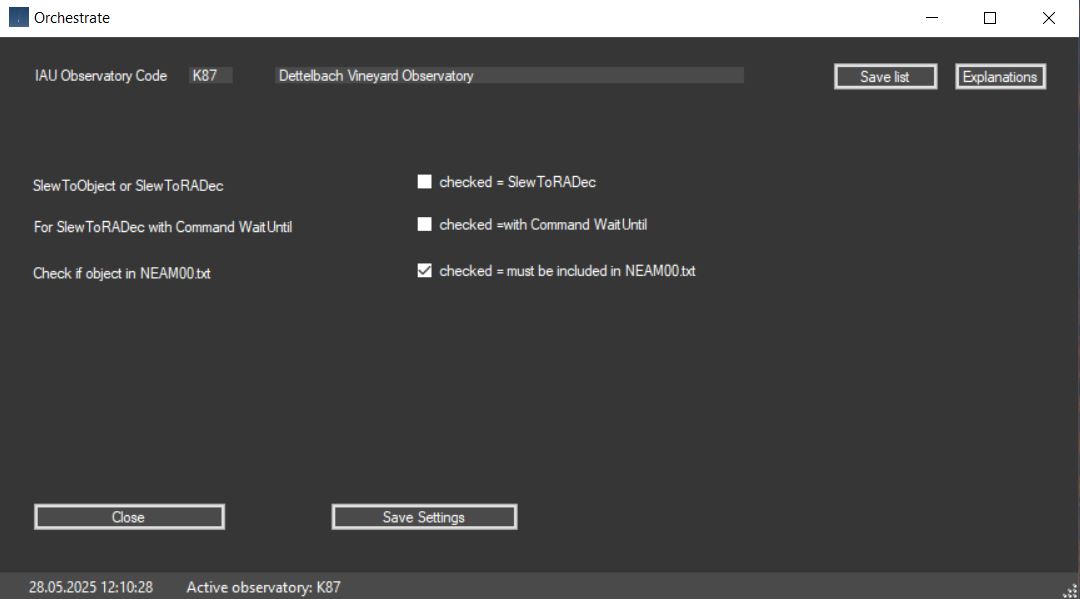
With every type of planning, whether with Execute Planning or
Smart Planning in Revise, an orch.txt file is created in the planning folder,
which can be used as an input file for Orchestrate from Software Bisque.
Orchestrate, similar to N.I.N.A. or ACP, takes over the
telescope and camera control with the help of TheSky.
Orchestrate dates back to 1998 and was last adapted to the Windows version of
the time in 2015.
With succeeded in making Orchestrate work with Windows 10 and TheSky X as well.
There are two methods for telescope and camera control.
1. with command SlewToObject: The starting point of the object's path is the center of the FoV with an end point towards an edge.
In this case, in TheSky (Input - Small Solar System Bodies -
Asteroids Small Database) the NEOCP objects determined in the plan with their
names
and orbital elements must be loaded manually (Add...) or automatically (from
File...) using the file skyorb.txt from the planning folder.
When loading NEOCP objects using skyorb.txt, please note that the orbital
element <a> (semi-major-axis) for non-periodic comet-like objects
must be corrected manually if a > 9999.
The orbital element <a> should always be checked manually on the MPC pages after
loading the skyorb.txt for NEOCP or PCCP objects.
In addition, a current NEAm00.txt must be loaded in the loading
window and imported into TheSky when observing NEO
(Input - Small Solar System Bodies - Asteroids Large Database).
For the observation of special or own objects from or beyond the
Main Belt objects together with NEOs, a current MPCOrb.dat
must be loaded
via Loading and imported into TheSky (Input - Small Solar System Bodies -
Asteroids Large Database).
Finally, the comets in the plan must be loaded into TheSky
(Input - Small Solar System Bodies - Comets) with By Name....
These can be copied from the file kometen.txt in the planning folder and must be
reduced to their short names after loading with Edit
(e.g. C/2022 E2 (ATLAS) becomes C/2022 E2).
With this method, the objects of the planning in The Sky are processed one after the other according to the CCD settings without time interruption.
2. with command SlewToRADec: The path of the objects can be centered in the FoV using the “Center Object” function in Execute Planning.
With this command method, objects are controlled by their R.A.
and declination, i.e. regardless of their name.
This significantly reduces the preparation time with TheSky because no input
objects need to be loaded.
However, the name of the objects cannot be saved during recording.
It is possible to assign the object names using the orchtemplate.txt file in the
planning folder.
The object lines also contain the corresponding positions, which makes it easy
to determine the name.
Experienced programmers can read these lines after the observation session and
rename the images themselves.
3. Check if object in NEAM00.txt: The file NEAM00.txt must be loaded after the DOU in the <Loading> tab before planning.
If the planning is loaded into Orchestrate via the interface file
orch.txt in
the planning folder and the objects are controlled via SlewToObject in
TheSky X, it must be ensured that a current NEAM00.txt has been loaded into
TheSky X in the Asteroids Large Database before the observation.
Please note that current NEAm00.txt files are only published by the MPC after a Daily Orbit Update (DOU), usually after 00 UT.
If this checkbox is enabled, NEO Planner checks whether the planned object is
included in the last loaded file, NEAm00.txt.
If not, the object is excluded from the planning and can be reactivated in the
Rejected Objects window if necessary.