NEO Planner V5.0 - Loading - Explanations
Within the picture, click on the area that you want to be explained: (not in all browsers available)
Copyright: The data comes from official access to web services from MPC
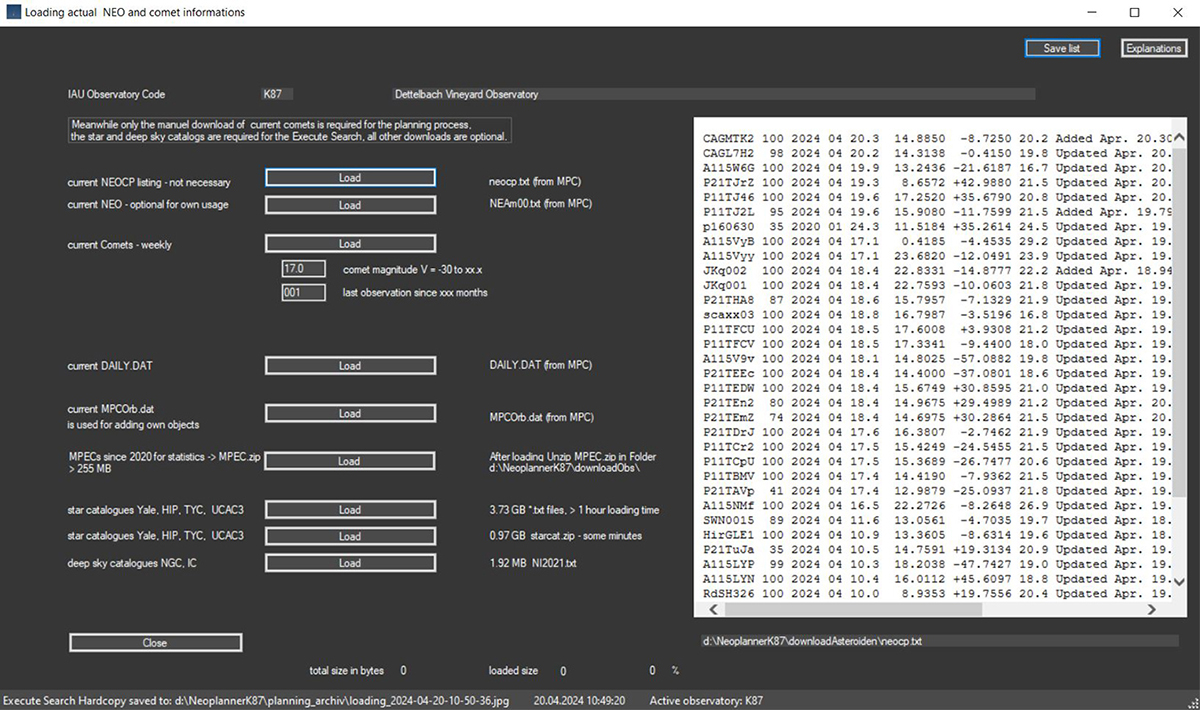
This snapshot shows a comet loading process with progress bars
Plausibility checks or actions are usually only carried out after leaving the cursor in the input field.
It is possible here to load the current NEOCP objects for information.
This is
not necessary for the actual planning, as the NEOCP data is always reloaded
there.
It is possible here to load the current
NEAm00.txt for information or for use in astronomy
programs such as TheSky X.
The loading is not necessary for the actual planning,
because NEO are loaded from the
API Web
Service of the
Horizons system
of the JPL.
Loading the current comets, which
were last published by the MPC with MPEC XXX: OBSERVATIONS AND ORBITS OF COMETS
AND A / OBJECTS.
The list shows those comets which
have been newly observed since the last publication.
In addition, all recently
observed comets are loaded from the Spanish comet observer site
CometasObs
and supplemented with the MPC list.
The Spanish comet watchers usually publish their measurements once a week on
Thursdays. So it makes sense to load the comets once a week on Friday.
Attention: Due to the waiting time
of weeks before the publication of new observations, there may be shifts to the
current real Vmag.
Also rarely observed outbursts of brightness can deviate from the MPC
publications.
In the case of comets, however, due
to the great distance from the Earth, usually there are no significant
deviations in the brightness
and are therefore not relevant for the planning
process.
The last observation date of the observable comets is loaded and the Vmag of the last 10 observations is averaged to determine the current real Vmag.
You can now enter the Vmag limit size up to which comets should be loaded.
The DAILY.DAT file is not used for planning and can optionally be loaded here.
The MPCOrb.dat file is not used for planning,
but for checking objects in the
More objects window.
However, it is used by Astrometrica and can optionally be loaded here. Please
adjust the file settings in Astrometrica if necessary.
Special feature after installing NEO Planner:
To speed up the loading of the MPECs for the
statistics, you can load most of the MPECs from 2020 to now into the ZIP file MPEC.zip
in the downloadObs folder.
After loading, you have to manually unpack the MPEC.zip file in the NEO Planner
downloadObs subfolder.
Star catalogues Yale, HIP, TYC, UCAC3
The star
catalogs are required for the Execute Search. Before loading, the desired target
folder must be entered in the folder structure settings.
Loading of the UCAC3 catalog in .txt files takes over an hour. If loading is aborted due to a
timeout error message,
please answer this with ok and monitor the target folder.
There must be a total of 365 files in the destination folder after loading. The
UCAC3 catalog contains the files k001.txt to k360.txt.
If these are not complete, you can simply repeat the loading process. Files
already loaded will not be loaded again.
A faster
charging method can also be selected. A starcat.zip file is loaded, which is
copied into the starcat folder.
There you have to unzip the zip file into the
same folder.
In the Execute
Search Window, if selected, Deep Sky can also display objects from the NGC, IC
Catalog NI2021.
These are displayed according to their shape, size and
orientation.
The revised NGC/IC catalog is copyrighted by Dr. Wolfgang Steinike et al. Corresponding information on the use of this catalog can be found here.